
At z80, there is never a shortage of work. In a small IT company, you wear every hat at once:
messages to deal with;
accounts to monitor;
social networks to run;
invoices to prepare;
servers to keep an eye on.
We made a choice: instead of chasing all of it ourselves, we have built, step by step, a team of AI assistants, each with its own job, and an organisation where humans stay in charge of what matters.
Here is how it works, without the jargon.
Before we start. This article is written for a broad audience. Some words in it are obvious to some readers and abstract to others: bot, quota, server, script… So we redefine them along the way, even if that means explaining things you already know. If that is you, skim ahead: the rest is waiting.
To write these lines, we put the method to the test: 32 AI engines were consulted in parallel, then 14 of them for a section added along the way.
What is a bot?
A bot is a software assistant that you entrust with a specific job. It works on its own, with nobody in front of the screen, and reports back when it is done.
To picture it, think of a new colleague: they need a mind to think with, a defined role, tools and a notebook. A bot is the same thing, with four ingredients:
A brain: an artificial intelligence engine (a “language model”) that can read, understand and write. This is the part that thinks.
A job description: written instructions that spell out its job, its rules and its limits.
Tools: carefully limited access to what it needs to do its work, such as our management software, an e-mail inbox or a calendar.
A memory: notes it can find again from one day to the next, because a bot does not remember yesterday by itself.
What a bot is not: neither a physical robot, nor a simple “chatbot” that answers a question and then falls silent. It acts: it reads, sorts, drafts, follows up, then notes what it did. And there is nothing magical about it: it only acts within the framework it has been given.
A bot at work
Our servers, meaning the computers that run our tools, talk to each other over a secure connection, a sort of private tunnel between them. If that tunnel goes down, the servers can no longer talk to each other and the whole infrastructure stops. A bot watches this connection and restores it when it drops.
Three words to remember
Quota: the share of our AI usage plan. Each time a bot wakes up it uses a little, like minutes on a phone plan.
Script: a small, ordinary program, with no artificial intelligence, that repeats a simple task, for example checking whether a new message has arrived. It uses no quota.
Webhook: a doorbell. It is a web address that a script triggers to wake up one specific bot when there is something to do.
A chief of staff and a dozen specialists
At the centre sits our chief of staff, itself an AI assistant. We talk to it like a colleague, in writing or by phone.
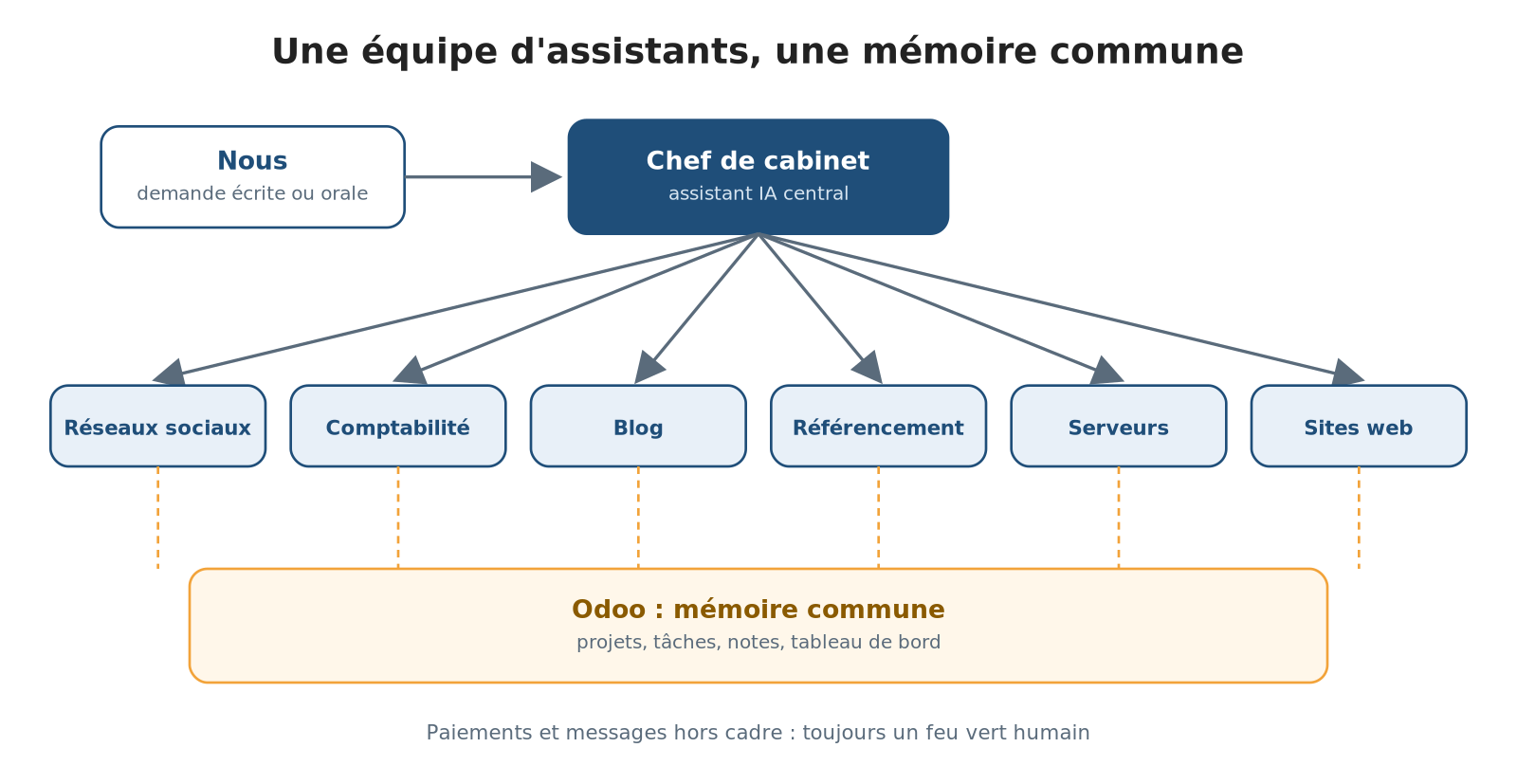
The team: a chief of staff and specialised bots
No need to pick the right contact or to explain the context again: it listens, breaks the request down and hands each piece to the bot best suited to handle it.
Around it, a dozen specialised bots:
one for our social networks;
one for accounting and Odoo;
one for the blog;
one for search engine optimisation;
one for the servers;
and others for a client, a game project or our websites.
Our social media assistant, for example, keeps watch on X, LinkedIn and Facebook. It spots posts that matter to our trade, likes them and, when it makes sense, comments on them.
And what about trust?
It is the question everyone asks. Our answer: we treat our chief of staff like a real personal assistant. When a task is handed over, it sees it through to the end. It uses and combines every tool at its disposal, installs new ones if needed, and takes initiative. If one method fails, it looks for another route on its own before reporting a blockage.
If a piece of information is missing, it first looks for it by itself: in Odoo, in e-mails, in documents, in its memory or on the web. Only failing that does it ask us, through an activity in Odoo that states precisely what is missing.
It also handles everyday exchanges with the outside world, from its own address and under its own signature: booking a hotel, answering a request for further information, chasing a supplier. The bots carry out recurring, already approved actions on their own, such as sharing a published article on social networks, without asking permission again.
A few safeguards stay locked:
no payment without a human green light;
no e-mail sent in a human's name without their explicit order;
no software subscription switched to a more expensive plan;
at a client's, nothing is submitted or changed without instruction;
no secret is ever displayed.
For everything else, it only disturbs us in case of a real blockage, serious doubt or risk.
The assistant acts, searches and takes initiative; the human steps in only when the stakes are real.
Bots that sleep as long as there is nothing to do
Every time a bot wakes up, it uses quota, that is, a share of our AI usage plan.
For a long time, our assistants got up every half hour to check whether anything new had come in, and often went back empty-handed. It was like paying an employee to stare out of the window.
Separating watching from thinking
The watching is handed to small scripts, simple programs that use no AI quota. They look, compare, and only wake the right assistant when what they see justifies it.
Since 7 November 2026, they run on ghost, a server that is always on, and no longer on the bots' computer, which can pause itself automatically: a script running there freezes along with it. When there is really something to deal with, the script rings the right assistant's doorbell (through a webhook). The assistant wakes up, does its work, confirms it has handled the event, then goes back to sleep. Markers prevent old events from being processed again.
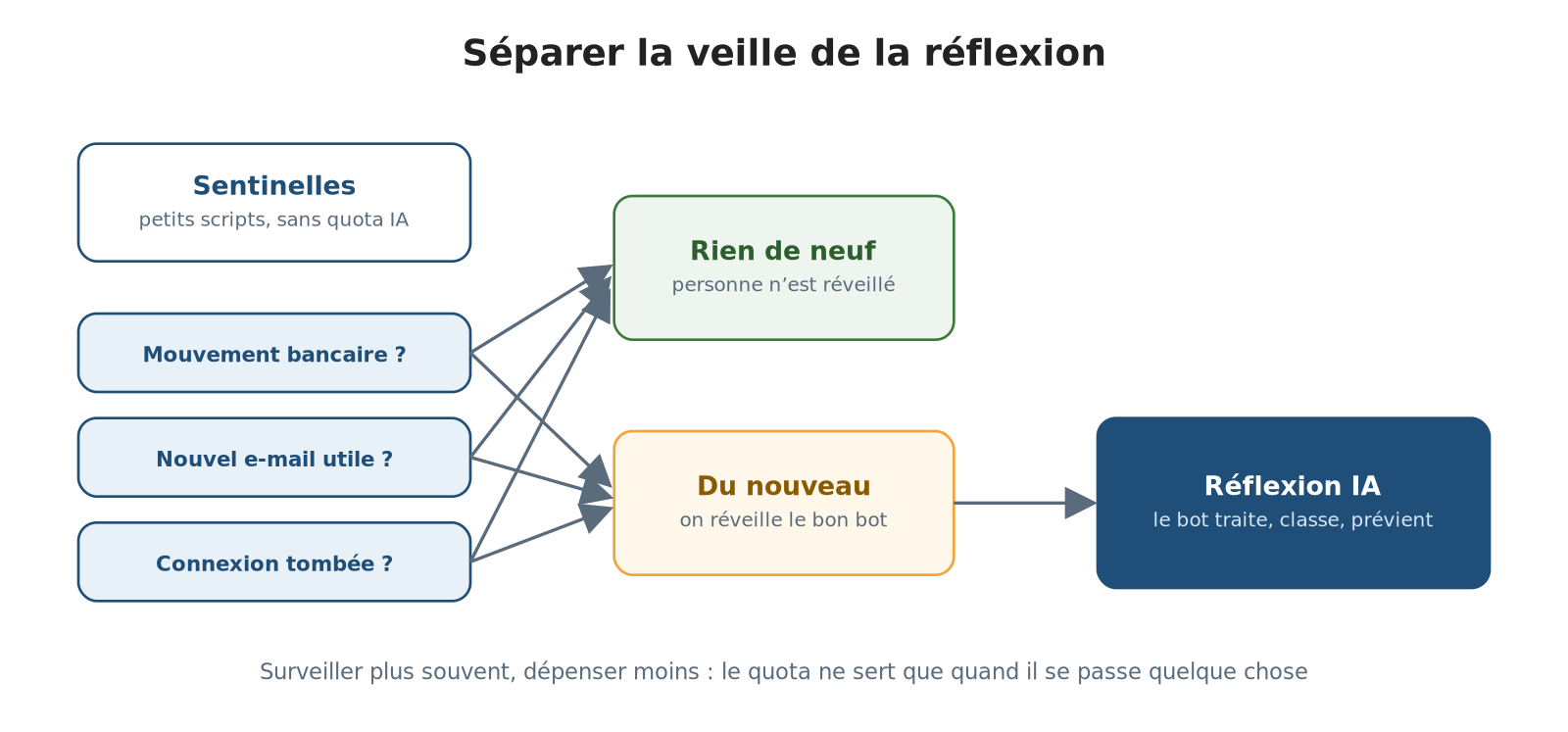
The watch wakes the thinking only when there is something new
Here is what they watch:
Bank accounts: if a transaction appears, the accounting bot is called in to categorise it.
E-mails: when new messages arrive, a check with no AI sets aside mere notifications, and the assistant only reads those that call for a follow-up.
Connections: if a connection drops or comes back, the information is passed on. As long as nothing changes, nobody is disturbed.
More often, for less
What we did not expect is that we now watch more often while spending less. Since a pass with nothing new costs nothing, some checks now run every fifteen minutes.
Monitoring that silently stopped would be worse than slow monitoring. So one routine watches over the others and alerts our chief of staff if any of them stops.
We have kept a few exceptions, knowingly: assistants that work through a web browser or publish at fixed times keep their schedule.
For the humans, nothing changes. E-mails get handled and the morning summary arrives at the same time. The difference shows on the bill.
Bots you can reach by e-mail
Every bot has its own e-mail address. This opens two doors:
Give them orders from anywhere, simply by writing to them.
Write to our clients: the bots send e-mails themselves, within a framework defined in advance by a human. Outside that framework, nothing goes out without a green light.
Some bots thus have regular exchanges with our clients, sometimes daily. A request from the client starts a task that runs by itself in the background.
Once the work is done, the result is sent back to the client automatically for approval. Everything goes through Odoo, from the first message to the final sign-off.
Every e-mail is sent from an Odoo task: the message, its signature and the whole history are found in the same place. By default, a bot signs with its own name; it writes in a human's name only on explicit order.
Odoo, our shared memory
For this team not to scatter, there has to be one place where everything comes together. For us, that is Odoo, our management software.
Each client or area has its project; each action has its task, with its history, deadlines and notes. Every piece of work done by a bot is tracked in a task: it notes its progress there, what it asked and of whom, and what is blocking.
We write our remarks there, the way you would leave a note on a colleague's desk. Odoo thus plays three roles:
the memory, because nothing gets lost in a forgotten conversation thread;
the dashboard, because one glance is enough to see where each file stands;
the mailbox between humans and their assistants.
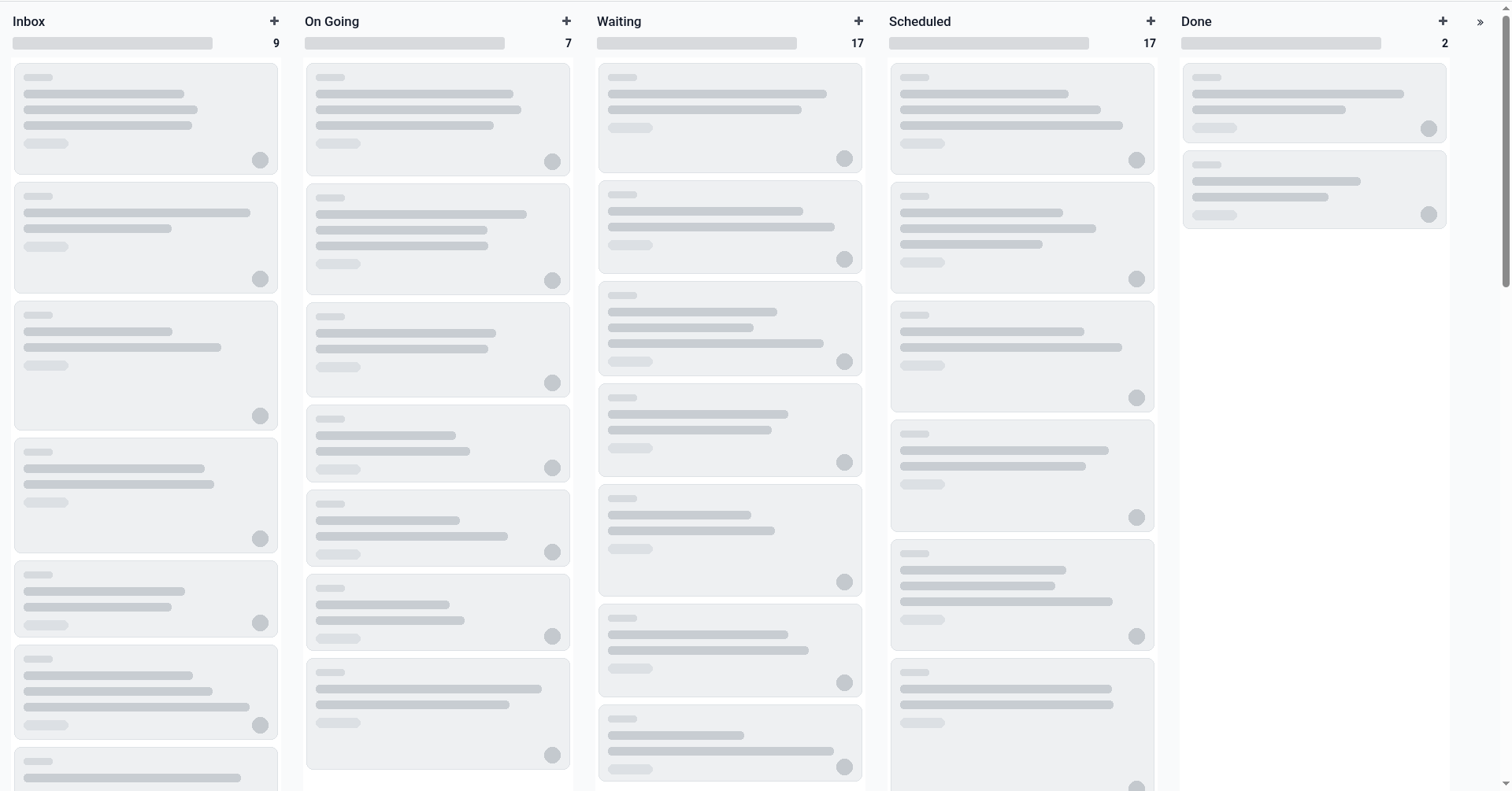
A project board in Odoo: each card is a task (content hidden).
Seeing the bots' work without waking them
What remained was to make that glance truly instant. The idea came to us from a public video about dashboards for AI assistants.
Rather than looking for a new tool, we asked ourselves a simple question: can our Odoo already do this by itself? The answer was yes.
A “Bot activity” dashboard
It updates itself and uses no AI quota, since it simply reads what already exists in Odoo:
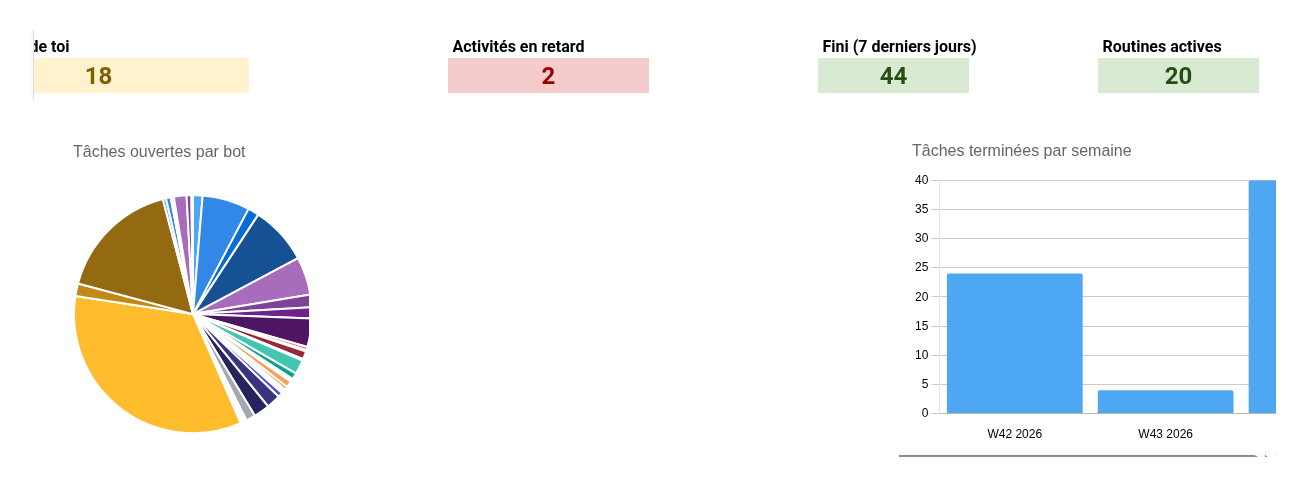
The dashboard: open tasks per bot and tasks completed per week
a few counters and lists show what is waiting for a human, what is late and what has been wrapped up;
a colour code, from green to red, shows where to act;
each bot has its own tag on tasks: at a glance, you know who does what.
A “Routines” project
Each scheduled routine of a bot becomes a task there, with its schedule, its role, its last run and its number of runs per day.
This simple inventory was revealing: some routines ran about thirty times a day and nibbled at the quota without always deserving it. Once visible, they stand out, and it is the human in charge who decides: they choose to space them out.
The tool sheds light on the decision; it does not make it for us.
The principle fits in one sentence: every piece of work done by a bot is tracked in an Odoo task.
To know where things stand, you just open Odoo, without waking anyone or spending quota to ask for a status report. The bots work, we watch, and decisions stay human.
It is not the most spectacular part of our organisation, but it is what makes the whole thing manageable.
An organisation that improves every week
An organisation like this is not built in one go. Here is what we added to it in early November 2026.
Paper mail arrives by itself
We scan our postal mail to a dedicated e-mail address. The document lands in Odoo and alerts the assistant. It reads it, then files it in the relevant task with a note on what is new, or creates a new task if the subject is new. It only asks us for input when a decision or a payment is ours to make.
Projects that stay tidy
Every task carries its tags, sits in the right project and in the column matching its date. The assistant re-sorts them every morning, and whenever new information changes the picture. A task waiting on a third party or on works goes into the “On hold” column. A task is only closed when its real-world outcome has truly been achieved.
Everything the bots write in Odoo (notes, descriptions, e-mails) is neatly formatted, with real headings, lists and tables.
A calendar that fills itself
Every day, the assistant starts from the activities planned in Odoo and fills the free time in our calendar with “pomodoros”: one-hour blocks of focused work. When something urgent comes up, it takes the place of a non-urgent pomodoro, which is moved to a later date. A full pass takes place early in the morning, followed by a recalibration at 1 p.m.
Social networks, from Odoo
Our three networks (LinkedIn, Facebook and X) are run as much as possible from Odoo's social marketing module: a single place to publish, reply to comments and like the positive ones. One exception remains: following new accounts on X is still a human gesture. The assistant prepares the list for us.
Backups to rebuild everything
Every weekday, the assistant's full configuration is backed up online, along with disaster recovery packages that would let another AI rebuild everything: rules, routines, links between the bots. Passwords are never copied into them: we re-enter them ourselves.
Everything is documented, automatically
Every change to a rule or a routine is documented as a matter of course: in Odoo's knowledge base, with diagrams, in an architecture document and in the machine's files. Another AI, or a human, can therefore take over.
A coach rather than one more bot
Rather than adding bots, I improve the ones I have. Once a month, I review the ones I had to correct most often, based on real traces: my corrections, my reminders, the work that had to be redone.
For each one, I pick out the three mistakes that keep coming back and their cause in the instructions: a vague goal, missing context, no example, no clear definition of “done”, or too many jobs for a single bot. A sharper instruction is proposed, with a good and a bad example from daily life. I compare the old and the new version, and approve bot by bot.
Nothing changes without my yes. The approval rules for sending, paying, publishing or deleting stay intact, and every version is logged, so we can go back.
I ruled out replaying tests with the old and the new version: it costs a lot of quota, and a bot in draft mode publishes and sends nothing, so it does not reproduce real conditions. The mistakes actually made are better evidence.
Several brains are better than one
A single model, even a very good one, has blind spots. It has its favourite turns of phrase, its oversights, and sometimes a confidence that exceeds what it really knows.
For routine tasks, our chief of staff moves ahead alone: no need to convene a committee to file an e-mail. But when a subject calls for real thought, it changes method.
How it works
The same question goes out in parallel to about ten families of AI models, including Claude, GPT, Gemini and Mistral. They do not talk to each other and do not know the others are working on the same brief. Each answers on its own, with its own logic.
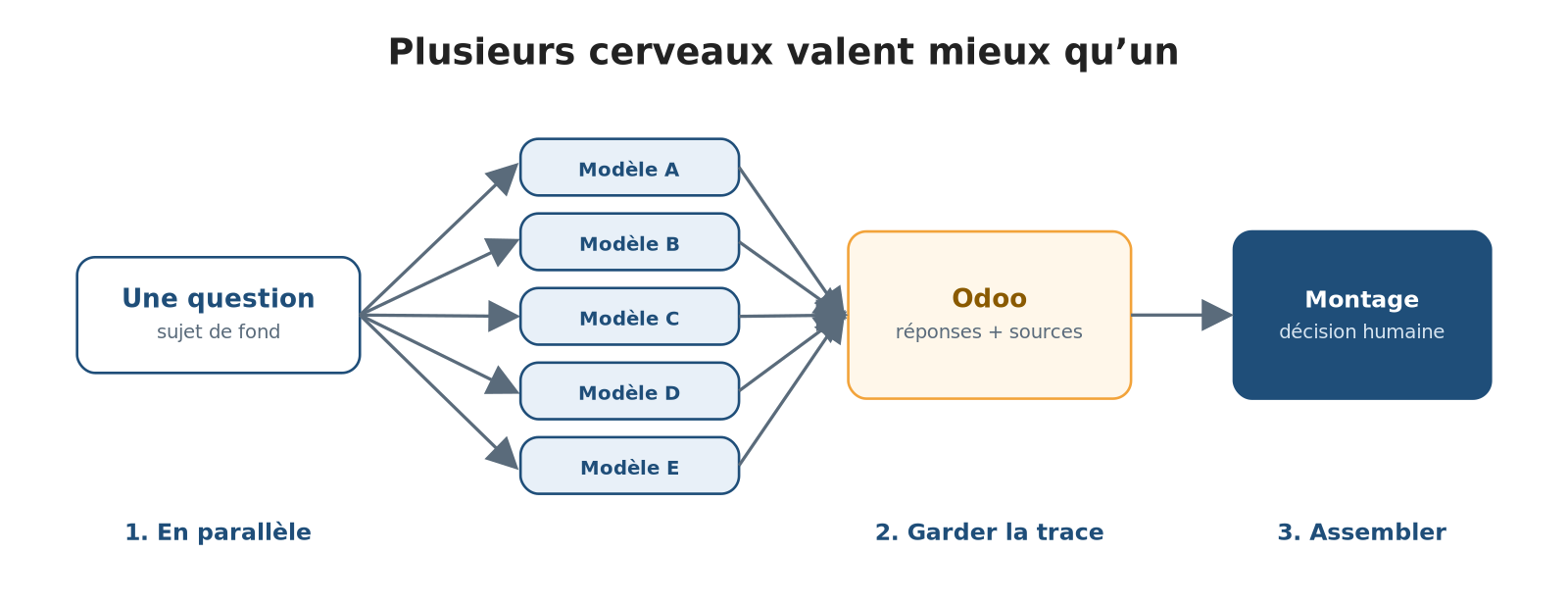
One question, several engines, one synthesis
Each answer is pasted as is into the Odoo task, with its source. Not like logs that get forgotten, but like pieces laid out on the same workbench. Weeks later, we can reread who proposed what and why a given wording won.
Then comes the assembly. We read the versions side by side, part by part, and keep, for each paragraph, the best piece and the author who supplied it: what is solid in one, what is clear in another, what was missing in both.
Agreement among several models is not proof, since they can share the same mistake; an isolated idea, on the contrary, can reveal what the others missed. The result is a jigsaw puzzle, reread so that it holds together as one piece, and the final decision stays human.
This method has a cost, which is why we reserve it for subjects that deserve it: comparison, deep thinking, last resorts. It is the same principle as our sentinels: knowing when an extra pair of eyes is worth the effort.
This article is the illustration: the 32 engines mentioned above, then 14 for the section added along the way, wrote its foundations. Their answers are stored in an Odoo task, and the text you are reading was assembled from the best pieces of each, then reread in full by 14 engines.
The point is not to have the best model. Models change; the organisation stays.
What matters is a place where viewpoints cross, where the reasoning can be replayed, and where a trace of the choices is kept.
The 32 models consulted
Grok Heavy via grok.com, the other 31 via Mammouth (mammouth.ai); the asterisk marks the 14 models also consulted for the section added along the way.
Grok Heavy*
Grok 4.7
Grok 4.7 Reasoning*
Grok Fast
Claude Opus 5.5*
Claude Sonnet 5.5*
Claude Fable 5.1
Claude Haiku 5.5
GPT-6.1 SOL*
GPT-6 LUNA
GPT-6 ASTRA*
GPT-5.4 NANO
Gemini 3.8 Flash*
Gemini 4 Argon*
Gemini 3.5 Flash Lite
Mistral Large 4*
Mistral Large 4 Reasoning
Mistral Small 4
DeepSeek V4.1 Flash
DeepSeek V4 Pro
DeepSeek V4 Pro Reasoning*
Perplexity Sonar Pro*
Perplexity Sonar
Perplexity Deep Research
Qwen 3.8 27B
Qwen 3.8 Reasoning*
Kimi K2.6
Kimi K3*
Llama 4.0 Maverick
Llama 4.0 Scout
GLM 5.3 Flash
GLM 5.3 Reasoning*
And for you?
None of this is reserved for large organisations. Quite the opposite. These ingredients suit freelancers and small businesses juggling too many tasks and too few hours:
a clear entry point;
well-defined specialists;
human checks where they count;
scripts that only wake the intelligence when it is worth it;
a central memory.
If this organisation gives you ideas, or if you build systems of this kind on a larger scale, let's talk.
A coffee, a call or an e-mail is all it takes to see what could be set up for you.